Category: Green Room

  • New Stylist App Contests: Two Ways to Win!


    We’re making the switch to our new Stylist App even more exciting with two contests running from August to December 2025. Whether you’re placing orders yourself or rallying your team, there’s a way for everyone to play and win!  We’ve seen great adoption since Conference and heard success stories from Stylists using it, so now we’re giving you more reasons to use the Stylist App.

    Contest #1: Monthly App Champion Contest

    How to Enter:

    • Earn 1 ticket into our monthly prize drawing for every 5 orders placed through the Stylist App.
    • Example: 20 orders in a month = 4 tickets in the drawing!

    Monthly Prizes:

    • 🎉 $500 to 1 Stylist
    • 🏆 $1,000 to 1 Stylist
    Winners are selected by random drawing from eligible entries.
     

    Timeline:

    • Runs August–December 2025
    • Winners announced on our Monthly All Stylist Calls

    Contest #2: You & Yours App Contest

    How to Enter:

    • Achieve the highest % of App orders placed by you (the Mentor) and your Level 1 Stylists from August-December.
    • Have a minimum of $50k in TV from August–December
    • Be Paid As Style Leader or above at least one month, between August–December 2025

    Prizes:

    • 🎉 Top 10 Teams (Mentor + Level 1 Stylists) each win $500 in product sample credits per person
    • Note: Only Mentors and their Level 1 Stylist with 50%+ of orders entered in the App will be eligible to receive $500 in sample credits. 
    • Note: Stylists must have a minimum of 8 orders in the Stylist app to qualify for credits

    Timeline:

    • Runs August–December 2025
    • Winners announced January 2026
    Now is a great time to reach out to your Clients, build momentum, and grow your earnings. If you have any questions about either of these contests, please reach out to the Stylist Success Team for assistance.

  • Introducing a New, Improved JESSI to Elevate your J.Hilburn Business 

    Over the past year, several teams within J.Hilburn—especially Stylist Support, Sales, and Technology—have been evaluating how we can help you, as a Stylist, to use AI in a way that gives you an immense competitive advantage in managing your J.Hilburn business. Our goal is to equip you with AI-driven tools that streamline your workflow, enhance client service, and support sustainable business growth.

    There were many challenges to overcome, such as bringing our AI efforts in-house, developing and refining new technologies from the ground up, and making them easily available to all Stylists. We are now happy to announce a new, improved JESSI available to you in the J.Hilburn Stylist App on iPad and iPhone.  

    Click below to watch an overview of our improved JESSI:

    Our improved JESSI was made with an obsessive attention to quality that is at the heart of J.Hilburn. With a deep contextual understanding of the conversations you have with your Clients, and up-to-date access to product availability, JESSI will be your go-to personal assistant, accessible to you 24/7! Below are some example questions that you can now ask JESSI within the iPad and iPhone app. 

    What kinds of questions can JESSI answer? 

    In addition to questions about the business process, such as the remake/return policy, regular promotions, and other timeless J.Hilburn information, you can now also ask questions about products and inventory

    Examples of prompts and messages to send

    Following are examples of the types of questions and prompts that you can send to JESSI about product-specific questions, fabrics, and garment recommendations: 

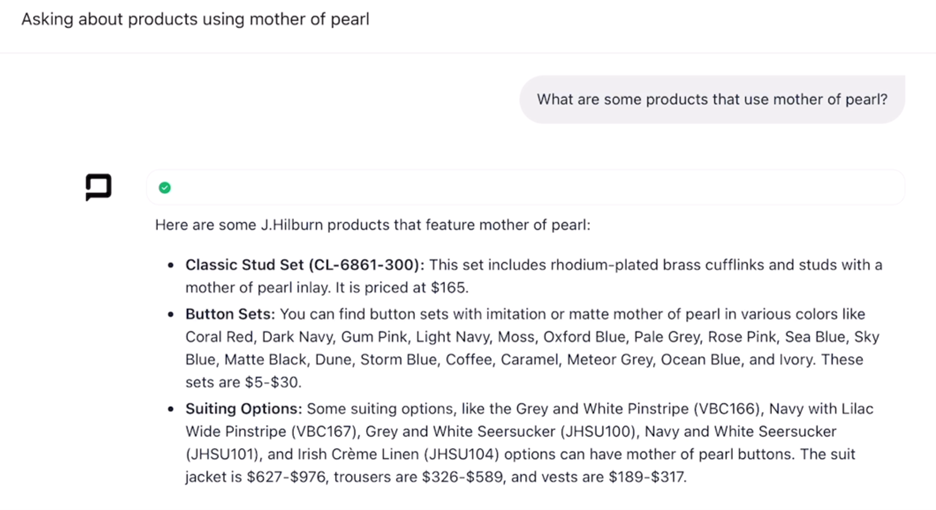
    • “My Client really likes the NI60. Recommend other shirts that are similar.” 
    • “Recommend some sportcoats that use Loro Piana fabric.” 
    • “Recommend sportcoats in linen.” 
    • “What trousers use silk in their construction?” 
    • “Tell me about which collar options are available for button-down shirts.” 
    • “Which corozo buttons are available for sportcoats?” 
    • “What is the difference between a plaid and windowpane pattern?” 

    Below are actual conversations with JESSI  based on the example prompts above: 

    How reliable are JESSI’s product recommendations?

    When you ask about J.Hilburn products, JESSI will infer which clothing items you’re searching for and then suggest items from among the top 50 relevant results. Because JESSI operates on a proprietary, custom-made J.Hilburn workflow, JESSI’s responses are over 90% accurate on the day’s inventory. However, for low in stock items, we recommend that you contact Stylist Support to make sure that the item is still in stock before offering it to your Client.  

    How can you correct and improve JESSI’s responses?

    If you suspect that JESSI told you something inaccurate, simply respond in the chat with what you feel the correct answer should be. JESSI will now remember that information for the rest of the conversation. However, in new conversations, these corrections won’t transfer over unless they are deemed essential information for our internal quality assurance review.  

    What is out of scope for JESSI?

    While JESSI is much more advanced than the original version, it doesn’t have access to much of the information and functionality within the iPad app. It also cannot act on your behalf to run business processes for you. This functionality is presented within the iPad app. 

    JESSI also will not search the web or present third-party information that is not within its training. This is to help keep the responses relevant to your J.Hilburn business while minimizing hallucinations (falsehoods) that are sometimes propagated by AI models.  

    How will JESSI continue to improve?

    JESSI is built on top of state-of-the-art Large Language Models (LLMs) like Gemini using the Artificial Intelligence technique of Retrieval Augmented Generation (RAG). Essentially, Every time you ask a question, this technique retrieves relevant information about J.Hilburn in a way that improves the relevance of the answer to your business.

    Currently, we are looking at adding additional information to JESSI’s knowledge base, such as Newsroom articles and common tickets that Stylist Support receives. As well, there are several promising techniques to allow JESSI to act on your behalf and automate specific processes around Client communication.   While JESSI has already evolved a lot, we are planning on continuously improving it in support of helping you to grow your business and provide a 5-Star experience to your Clients. To help JESSI continue to improve, please talk to JESSI! The more you talk to JESSI, the more it will listen, learn, and become better able to support you!

    Get More Information

    JESSI Tutorials can be found in Revolution.

    To access Revolution: 

    1. Click on ‘My Team’ in the iPhone or iPad app.

    1. Click on ‘Videos’.

    3. Click on ‘Stylist App Tutorials/Quick Tips’. 

    Have questions about JESSI?
    Book a one-on-one Zoom call to get personalized support and answers to all your questions:

  • Denim Update: April 1, 2025

    Stylists, we have an exciting update regarding Denim production:  

    The Trinity Denim washes are now available again as of today, April 1st 

    This includes all three versions of the Trinity wash: 

    • CID2-DP: Trinity Medium Clean Wash Italian Denim 
    • JHD2-DP: Trinity Medium Wash Stretch Denim 
    • JHD4-DP: Trinity Medium Clean Wash Stretch Denim 

    As of now, the wash formula is still being perfected to achieve the quality standards we require for the remaining denim washes, which may take a few more weeks to complete, but we are working urgently to complete testing and resume production.  We will let you know as soon as we have additional updates.  

  • Update to Remake Options in Green Room

    In pursuit of our mission to streamline the Green Room for Stylists, we’ve upgraded our remake options. These enhancements address scenarios stylists may face and reduce the need for JH credits for non-refund-related purposes.

    Now you will have the ability to:

    • select a new fabric on a remake when the original fabric is out of stock.
    • change fabrics on any remake.
    • process a remake for style changes.
    • Charge the client for any price changes from the original order to the remake due to fabric or styling changes.

    Remake and Return FAQs

    • Remake: each customer is entitled to up to two complimentary remakes for custom shirts, suiting, casual bottoms, knits, and outerwear. Remakes are intended for a Client who is experiencing fit issue which can not be resolved by an alteration.
    • Return for JH Credits:  a client can choose to return a garment for JH credits if he is not interested in an alternative fabric or remake. JH Credits are automatically applied to a client’s account once the original garment has been received at the warehouse. Processing time for JH credits is 7-10 business days after shipping. Stylist will be clawed back the associated commission on a return for JH credits. 
    • Refund: Refunds will only be issued to the original payment method. Processing time for refunds is 7-10 business days after the garment has been received in our warehouse. Stylist will be clawed back the associated commission on a refund.

    • If a stylist is placing a remake and the fabric is out of stock, Green Room will display a field for selecting a new fabric in the same category.  After selecting a fabric, the stylist can proceed with the remake with the new fabric. Based on his fabric selection, the client will charged for any price changes from the original order to the remake.  If the Client does not like any of the available fabrics the stylist will need to process a refund. 

    On the final screen of the remake process, stylists have the ability to select a Rush or Extreme Rush Fast Pass and charge the Client accordingly. 

    CUSTOM REMAKES

    • All remake and alteration requests should be placed through your personal Stylist within 90 days of the order’s ship date. If you do not have a Stylist, please reach out to our Support team at support@jhilburn.com.
    • All remakes are reviewed by our Fit Advice team to ensure that remaking the garment is the best option. If we determine that the desired changes can easily be altered by a local tailor, we will contact you.
    • Please note, that a remake means that we will produce a brand-new custom garment for you. This will take approximately 3 weeks for custom shirts, knits, and casual bottoms, and around 5 weeks for suiting and outerwear.
    • Each customer is entitled to a maximum of two complimentary remakes for custom shirts, suiting, casual bottoms, knits, and outerwear. One should be enough, but we offer two, just in case.
    • In exceptional circumstances additional remakes may be approved if an item is lost in transit, arrives with a manufacturing defect, or has dimensions outside of our accepted tolerances. These exceptions must be approved by our Fit Advice team.
    • Remakes are subject to fabric availability. If your original fabric is unavailable a remake can be placed with an alternative fabric of equal or lesser value. If an alternative fabric is not available, the item can be returned for a refund.
    • Once your remake request is submitted, we will provide you with a shipping label to return your original items. If we do not receive your returns within 30 days, we’ll assume you’re keeping the items and charge the credit card we have on file
    • If your body measurements change significantly after your order is placed the terms and conditions of this remake and return policy no longer apply. In these circumstances, we will review on a case-by-case basis.


    CUSTOM RETURNS

    We will accept returns of shirts, knit tops, and casual pants that have been laundered once or twice. We encourage you to launder these items to remove normal garment shrinkage so that you can better evaluate the fit. However, J.Hilburn is unable to accept returns or remakes on Custom Garments that have been altered, damaged or show signs of excessive wear.

    • All requests for returns need to be made within 90 days from the garment’s ship date.
    • Refunds can only be issued to the original form of payment within 90 days of the original order.
    • Processing time for refunds is 7-10 business days after the garment has been received in our warehouse.
    • JH Credits can be redeemed to the original form of payment within 90 days of the original invoice.
    • J.Hilburn is not liable for returns that are lost in transit. Please keep a record of the tracking information when returning garments.

    If you believe your client’s garment was produced in error, please follow the process outlined on our factory error process page.

    Order Investigation Process

    • Remakes will now be approved for styling or personalization changes. Please note: a styling remake will count the same as a fit remake when calculating a stylist’s remake rate for Golden Tape.
    • We find that the best Client experience is achieved by confirming a new fit before proceeding with multiple remakes in a category. For this reason, we ask that the client choose the fabric he would like to proceed with first. Once his fit is confirmed the remaining garments can be remade.
  • Green Room Quick Reference Guide: Finding Unsubscribed Clients

     This Green Room Reference Guide will show you how to pull a list of your clients and filter clients that HAVE UNSUBSCRIBED FROM HOME OFFICE EMAIL MARKETING. 

    This is an important list for you to pull monthly to ensure you have the most updated client information as you reach out. Unsubscribed Clients should be the first segment of clients you reach out to. They are only receiving communication from you. Therefore, making these Clients, a priority will be lucrative for you.

    Green Room Quick Reference GuideVolume 2.0 

     In creating this list, you will have a “call list” you can use as a hook to activate clients, sales, appointments, etc. Having this list gives you a great starting point each month to ensure your Unsubscribed Clients take priority and are being serviced along with generating revenue for you and your business. 

     Please follow the steps below to download and filter your Unsubscribed Clients in the Green Room. 

    Let’s dig in… 

    1. Login into your Green Room and click My Clients > All Clients. 

    2. You will see a button that says “download” click this button, and your complete list of clients will be downloaded to your downloads folder. 

    3. Open the spreadsheet file. NOTE: this Reference Guide shows how to filter Unsubscribed Clients via Microsoft Excel. 

    4. Delete any columns A-V of data that you might not need to clean up your spreadsheet. NOTE: don’t delete the “Unsubscribed” column. You will need this column of data in a moment. 

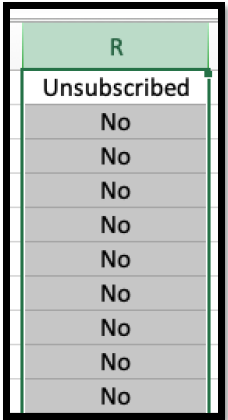
    5. Find the “Unsubscribed” column and click the letter above to select the entire column. Click “R” to select the “Unsubscribed” column in this example. See below. 

    Unsubscribed

    6. Once you have the entire “Unsubscribed” column selected, it’s time to filter out all the “No” clients, as these clients have currently opted into our marketing emails. You want all the clients with “Yes” listed as these clients are Unsubscribed. 

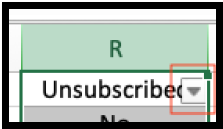
    7. With the column still selected, find “data” at the top of your Excel window. Click “data” then “filter.” Once you follow these steps, you will see a box appear that you can select.

    Filter

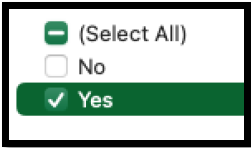
    8. When you open the box selector, you will see filter options. Deselect all but the “Yes” section. You will filter all the clients who are subscribed to our email marketing (No), leaving only the Unsubscribed Clients (Yes). This is the data you are looking for. 

    Select Yes

    9. Make sure all the clients in your column as Unsubscribed = Yes. You now have a tailored list of only your Unsubscribed Clients. 

    10. You have two options from here 1. Save your spreadsheet as is to keep your Unsubscribed Clients or 2. Copy all the information from your Unsubscribed Clients, paste it into a new Excel spreadsheet, and then save.