Gift Cards are a great way for your Clients’ family to give him the gift of style or for your Client to refer you to a New Client.
Learn answers to the top questions about gift cards.

Gift Cards are a great way for your Clients’ family to give him the gift of style or for your Client to refer you to a New Client.
Learn answers to the top questions about gift cards.
To be counted towards your Sales Volume for the current month, orders must be submitted no later than 11:59pm Eastern Standard Time on the last day of the month for which the order is to be counted.
For example, to have orders count towards your November Sales Volume, you must submit the order no later than 11:59pm Eastern Standard Time on Thursday, November 30.
This means that we will not backdate orders or clawbacks.
We know it’s important for you to know when your Clients’ orders will arrive, so that you can set expectations with your Clients and schedule those Delivery Appointments!
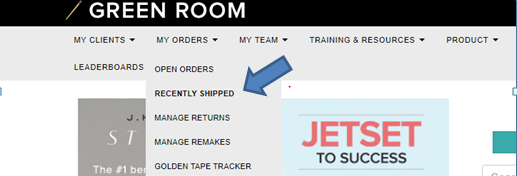
We’ve made it simple to track what items have shipped.
Once you log into the Green Room, go to the “My Orders” tab, then select “Recently Shipped” from the drop down menu.
We know how exciting it is to see the fruits of your labor, and we know that a big part of that is receiving your monthly commissions.
We will not mail a physical check. We will automatically deposit your earnings into the account you specified when you enrolled with us on or before the 15th of each month for the preceding commission period.
For example, for the commission period of January, you will receive your direct deposit on February 15, and so on.
If your earnings are less than $25.00 for the month. We cannot automatically disburse any earnings less than $25.00. We will add any earnings under $25.00 to the commission payment for the following month’s commission period.
For example: If you earn $20.00 in January, and $300.00 in February, we will not deposit the $20.00 for January commissions. Instead, we will add it to your February commission deposit.
Are you setting up your J.Hilburn email account on your phone, tablet, or another mail application? Follow these simple steps!
If you still have questions regarding setting up your J.Hilburn email account, please contact stylistcare@jhilburn.com.