This Green Room Reference Guide will show you the best way to see all the CLIENTS THAT PURCHASED FROM YOU IN THE SPRING 2021 SEASON.
There are many ways you can see which clients purchased from you in a specific period, BUT we have chosen the fastest and most efficient way to see CLIENTS THAT PURCHASED FROM YOU IN THE SPRING 2021 SEASON.
Please follow the steps below find and access CLIENTS THAT PURCHASED FROM YOU IN THE SPRING 2021 SEASON.
This example will define the SPRING 2021 SELLING SEASON From 01/01/2021 To 07/01/2021.
Let’s dig in…
1. Login to your Green Room and click My Team > Volume Reports.
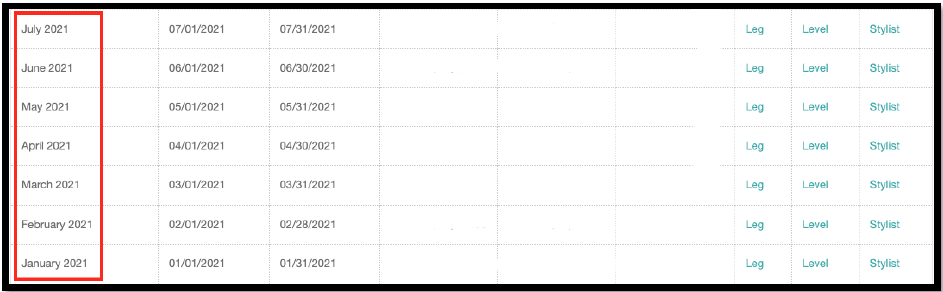
2. Find Jan 2021 – July 2021. This segment of clients we are focusing on for the Spring 2021 season.
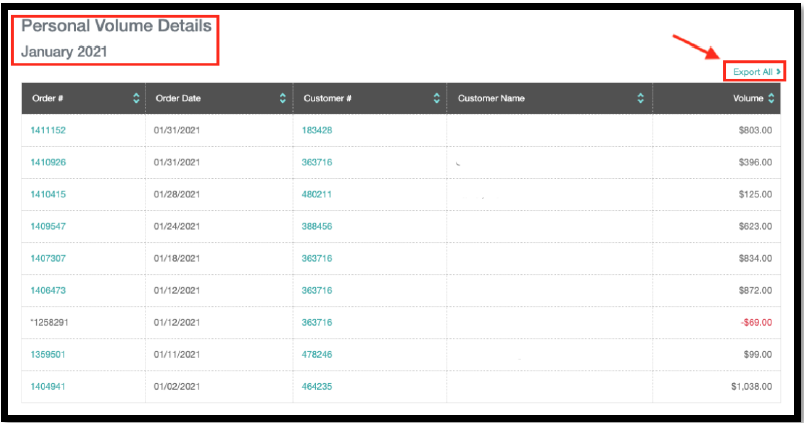
3. You will need to Click >Total PV-Q for each month Jan 2021 – July 2021 to collect all the information you want regarding CLIENTS THAT PURCHASED FROM YOU IN THE SPRING 2021 SEASON.
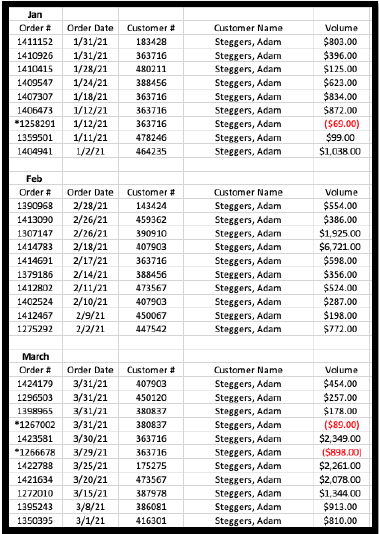
4. Month by month Jan 2021 – July 2021, either copy the client information from each page or click “Export All.” We recommend clicking “Export All” as you can build your own outreach spreadsheet for all the CLIENTS THAT PURCHASED FROM YOU IN THE SPRING 2021 SEASON.