A new tool has been added to your Green Room that allows you to easily download personalized, brand-approved invitations for Client and team events.
Images featured in this tool are Essentials, Golf, and Formal Wear. We will monitor the usage of this tool, and, if demand is high, we will add more images in the future. If you have suggestions on what images to add or how to make this tool better, please use the Feedback Button in the upper right-hand corner of the Green Room.
Watch the Instructions:
Read the Instructions:
1. Navigate to Green Room»Marketing»Invitations
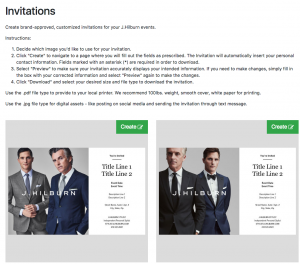
2. Decide which image you’d like to use for your invitation.
3. Click “Create” to navigate to a page where you will fill out the fields as prescribed. The Invitation will automatically insert your personal contact information. Fields marked with an asterisk (*) are required in order to download.
You may need to break your event name into two lines in order to accomodate character counts.
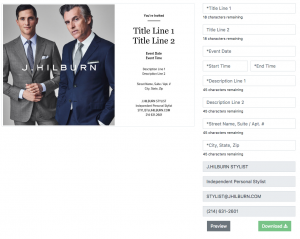
4. Select “Preview” to make sure your invitation accurately displays your intended information. If you need to make changes, simply fill in the box with your corrected information and select “Preview” again to make the changes.
5. Click “Download” to select your desired size and file type to download the invitation.
Use the .pdf file type to provide to your local printer. We recommend 100lbs. weight, smooth cover, white paper for printing.
Use the .jpg file type for digital assets – like posting on social media and sending the invitation through text message.
Guidelines:
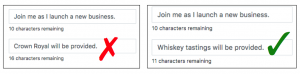
- The use of other brand names, vulgar language, or profanity will not be tolerated.
- Make sure your events uphold J.Hilburn Core Values. You are a representative of J.Hilburn, and you should be mindful of the types of events you host and always conduct yourself with integrity.
- Do not create your own events for Corporate-sponsored initiatives or events; such as Road to Growth, Conference, Becoming a Stylist calls, national or regional Recruiting efforts, Corporate-led Showroom or Studio events, etc. If needed, the Corporate team will provide you with the appropriate tools to promote these types of events.
The Corporate team will monitor invitation downloads and may revoke your access to this tool if we see violations.
Event Name Ideas:
- Scotch & Swatch
- Graduation Event
- {{City}} Trunk Show
- Meet & Greet //or// Meet {{New Stylist Name}}
- New Business Launch
- The Spring Event
- Bourbon & Blazers
- {{City}} Meet-up