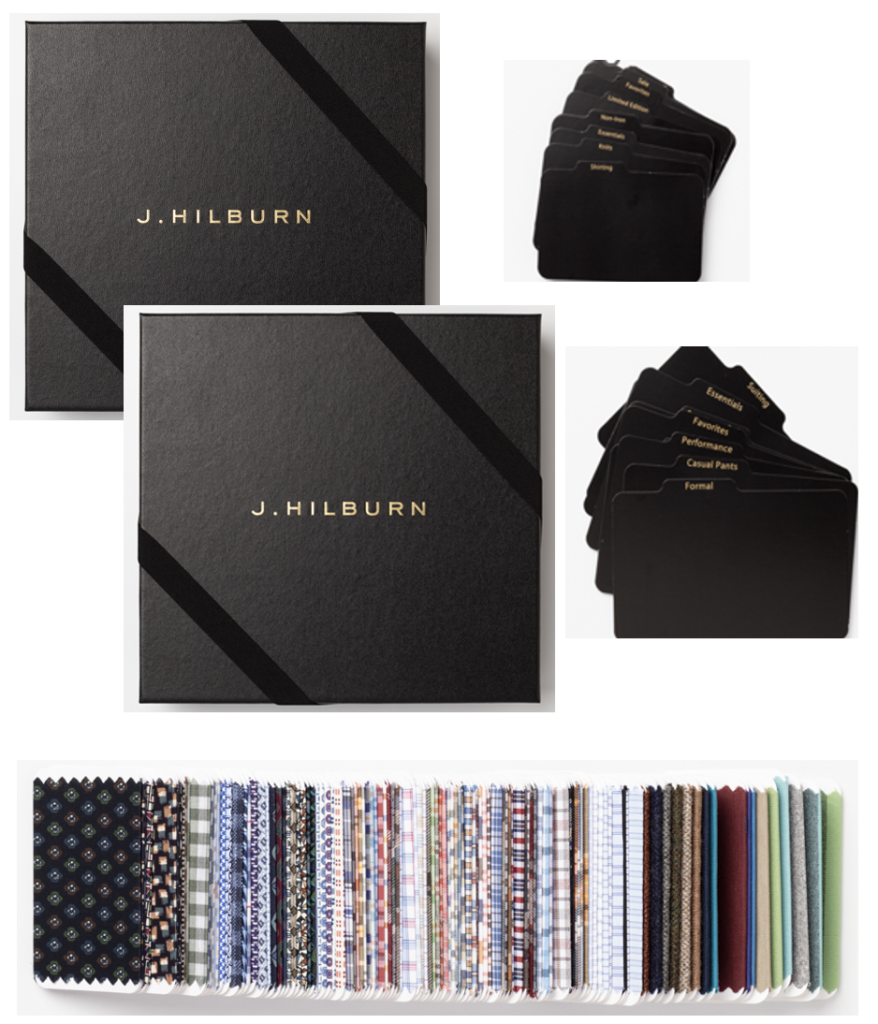
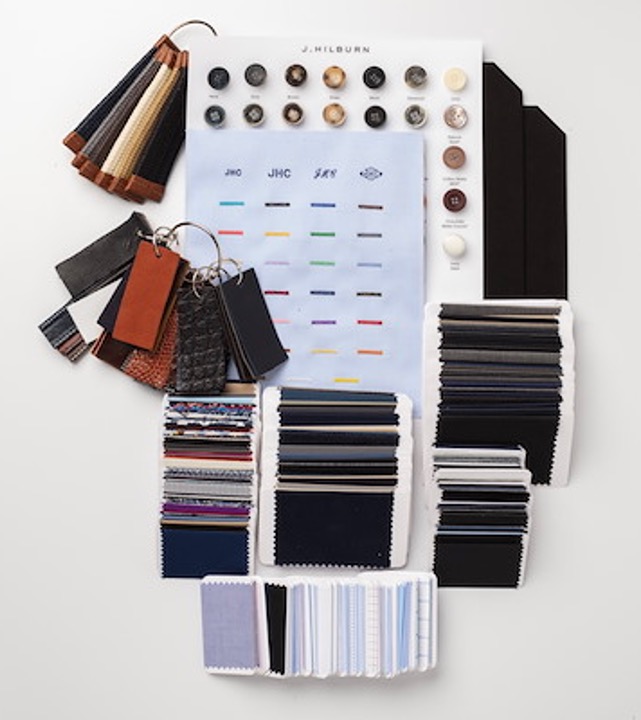
To help you get ready for the Fall 2022 Collection launch next month, we have just the thing—our new Sales Tools 2.0! We’ve updated our FAQ with additional questions and answers regarding sales requirements for seasonal swatches, and how we are handling Sales Tools 2.0 for New Stylists.
We’ve also put together a 2022 Essentials & Accessories Bundle for $320, which contains everything additional to the free items you’ll receive. That’s everything you need to complete your set of Sales Tools for a successful Fall/Winter 2022 season and beyond! In the Green Room under the Training tab, go to the Stylist Store and click the easy button to order the 2022 Essentials and Accessories Bundle — once click and your Sales Tools set is complete!
2022 Essentials & Accessories Bundle
$320 in the Stylist Store
Note: Since we published this FAQ, we’ve received some additional questions regarding sales requirements for seasonal swatches, and how we are handling Sales Tools 2.0 for New Stylists. These additional questions and answers are now in the Q&A at the end of this article.
Your J.Hilburn Stylist Development Team and Product Team are proud to present our new Sales Tools 2.0! We have been working with a dedicated team of Stylist developers and beta testers to provide the most compact and portable way to carry your J.Hilburn Sales. The official format of Sales Tools will change to this new system starting July 14, 2022.
All Stylists will receive their Fall/Winter 2022 swatches in the new format, with the basic Sales Tools 2.0 components, for FREE! Stylists attending Annual Summit 2022 will receive their Sales Tools onsite at the event, with non-attendees being shipped their Sales Tools after the event. Also, pre-order is now open in the Stylist Store for attendees who would like to purchase add-on items, which can also be picked up at the event. Read on for all the details!
Shirting and Knit swatches are on individual swatch cards. Suiting, Casual Pants and Outerwear fabrics are on larger individual swatch cards.
The following items are available a la carte, or you can purchase an Everything Bundle for $500 ($70 discount off total a la carte price), which includes 1 of each of the following items:
Visit the Stylist Store today to pre-order additional items! (In Green Room, select “Stylist Store” from the “Training & Resources” menu.)
Large Presentation Box Dividers:
Small Presentation Box Dividers:
Each Stylist will receive an Fall/Winter 2022 Sales Tools 2.0 Set:
No. Whether you are attending Annual Summit 2022 and shipping your Sales Tools 2.0 home, or if you are not attending and you receive your Sales Tools 2.0 after the event, shipping is free.
Yes, Stylists can purchase the components a la carte or they can order the Everything Bundle. See #3 above for pricing.
Friday, June 10, 2022.
If you attend Annual Summit 2022, you will be handed your new Sales Tools after you sign in at registration. If you can’t attend Summit, you will receive your Sales Tools via UPS the last week of July.
Yes, Stylists can purchase a maximum of three sets of Sales Tools.
All Active Stylists who have sold over $1,000 in the last 12 months will receive the free Sales Tools 2.0 Set.
Yes, all the new components of the Sales Tools 2.0 will be in the New Stylist Kit and it will come in a beautiful new presentation box.
Starting July 14, 2022.
No. You will need to reuse the boxes sent to you in your introductory Sales Tools 2.0 Set for future seasons. If you want additional boxes after this initial launch, you will always have the opportunity to purchase them in the Stylist Store.
Existing Stylists who sell over $1,000 in the prior 12 months will be shipped seasonal sales tools.
No, Stylists who join as Digital only will not receive sales tools and seasonal swatches. If these Stylists would like to upgrade and receive seasonal sales tools on an ongoing basis, they can purchase a Digital Stylist Upgrade for $300 in the Stylist Store, which includes Seasonal Swatches on an ongoing basis, 2 presentation boxes, divider tabs, merchandising board and Essential Swatches (one time only).
Yes, a New Stylist who joins in June or July joins the business in what we consider crossover months, and will receive the entire set of New Sales Tools (2 presentation boxes with the divider tabs and merchandising board, Fall 2022 Seasonal Swatches, Essential Swatches, Lining Swatches, Assembled Button Cards, Contrast Thread and Monogram Display and Belt Shorties).
Yes, any New Stylist that enrolls with J.Hilburn after the launch of the New Sales Tools, will receive the New Sales Tools in the New Stylist Kit moving forward. This will include 2 presentation boxes with divider tabs and merchandising board, Fall 2022 Seasonal Swatches, Essential Swatches, Lining Swatches, Assembled Button Cards, Contrast Thread and Monogram Display and Belt Shorties.
This Green Room Reference Guide will show you the best way to see all the CLIENTS THAT PURCHASED FROM YOU IN THE SPRING 2021 SEASON.
There are many ways you can see which clients purchased from you in a specific period, BUT we have chosen the fastest and most efficient way to see CLIENTS THAT PURCHASED FROM YOU IN THE SPRING 2021 SEASON.
Green Room Quick Reference Guide – Volume 3.0
Please follow the steps below find and access CLIENTS THAT PURCHASED FROM YOU IN THE SPRING 2021 SEASON.
This example will define the SPRING 2021 SELLING SEASON From 01/01/2021 To 07/01/2021.
Let’s dig in…
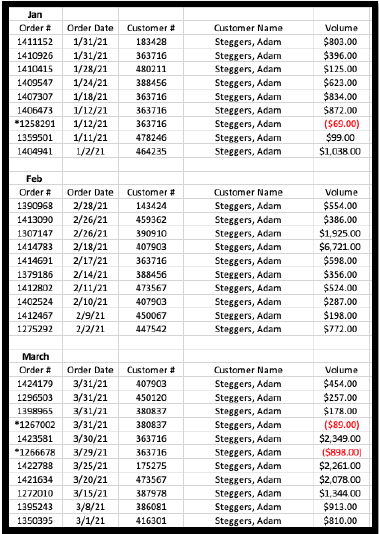
1. Login to your Green Room and click My Team > Volume Reports.
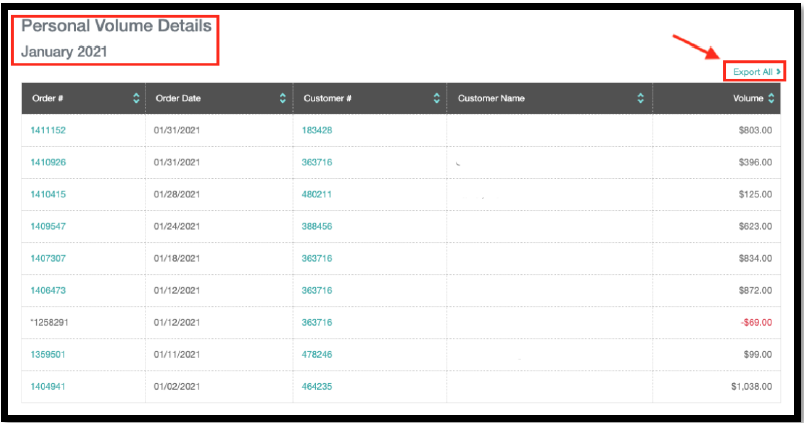
2. Find Jan 2021 – July 2021. This segment of clients we are focusing on for the Spring 2021 season.
3. You will need to Click >Total PV-Q for each month Jan 2021 – July 2021 to collect all the information you want regarding CLIENTS THAT PURCHASED FROM YOU IN THE SPRING 2021 SEASON.
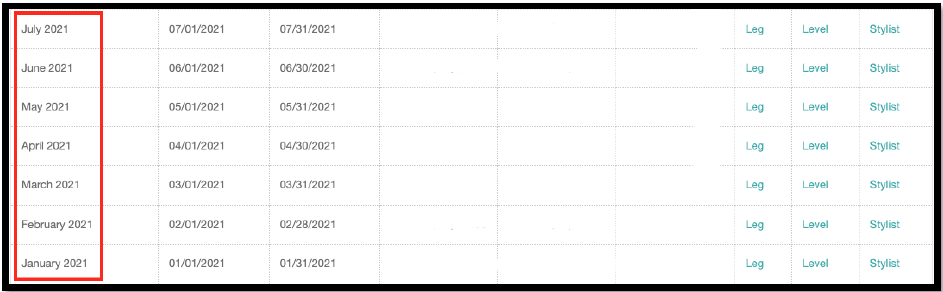
4. Month by month Jan 2021 – July 2021, either copy the client information from each page or click “Export All.” We recommend clicking “Export All” as you can build your own outreach spreadsheet for all the CLIENTS THAT PURCHASED FROM YOU IN THE SPRING 2021 SEASON.
This Virtual Assistant Reference Guide will show you how to create a List Builder list of clients that LAST PURCHASED DURING THE SPRING 2021 SEASON. We also show you another way to see CLIENTS THAT LAST PURCHASED DURING THE SPRING 2021 SEASON by sorting your client list.
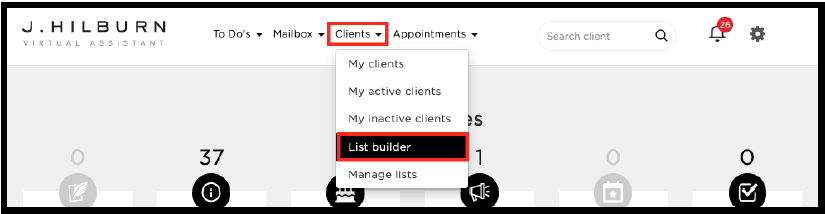
Please follow the steps below to create a list of your list of CLIENTS THAT LAST PURCHASED DURING THE SPRING 2021 SEASON. Let’s dig in…
1. Follow the image above and click Clients > List Builder.
2. Click the drop-down > Filter by purchase behavior
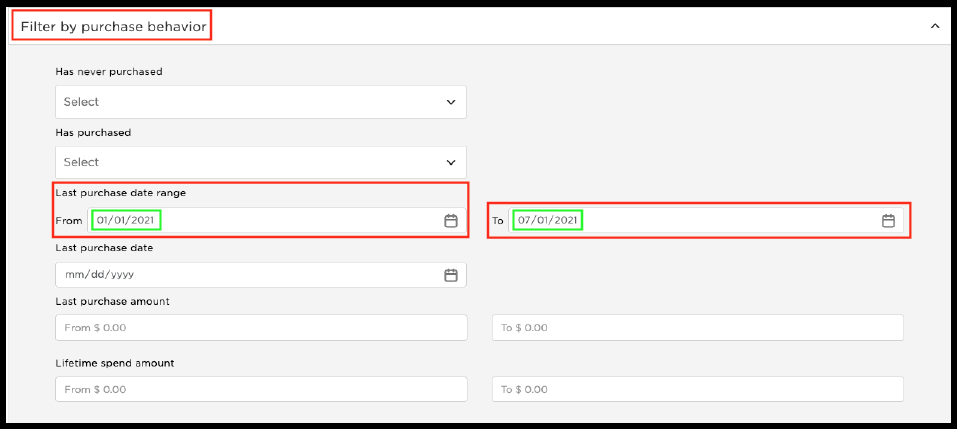
3. To finalize your list, select the method of how you would like to sort your list.
4. Select your “Sort by” option by clicking on the left and right column drop-down selections. You can see these selections pictured below.

5. You are now done and ready to view your list and begin your client outreach to high potential buyers from the Spring 2021 season. After you select your sort by method, click “Confirm and Search.” Remember, you can use the Virtual Assistant (call, email, text), Style Boards, etc., in reaching out to your clients.

6. Review your list and make sure you are happy with the client data and how it is presented, i.e., sort by.
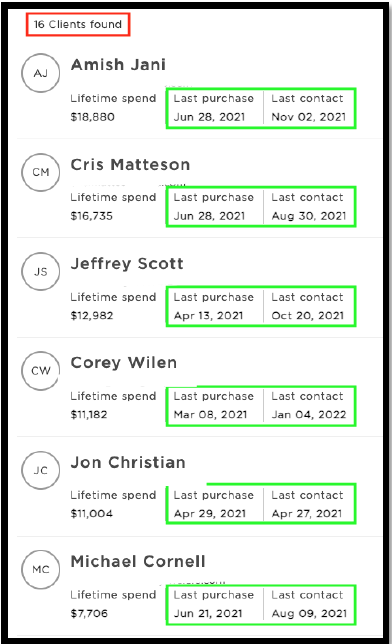
7. Try it for yourself and create your list of targeted Clients that LAST PURCHASED FROM YOU IN THE SPRING 2021 SEASON. After reviewing your list, don’t forget to Save Your List and Name Your List to access whenever you would like.

Let’s now shift gears and use the Virtual Assistant to see a less targeted list of Clients who LAST PURCHASED FROM YOU IN SPRING 2021.
1. Start fresh and go to the top of your Virtual Assistant page and click > Clients > My Clients.
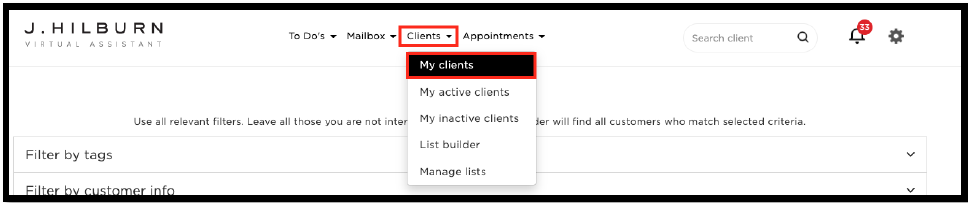
2. You now have full access to your entire client base. Again, this is a broader list of your Spring 2021 Clients.
3. You will see at the top of the page several drop down’s just like you have in the List Builder section. Click > Sort by > Last Order > Most Recent.

4. Once you have made the selections above, click “Confirm and search.”
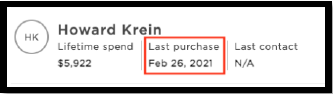
5. Remember, this is a list of all your clients sorted by “Last Order” in order of “Most Recent” order dates—scroll and page through to find a client with a purchase date in January or February 2021. You can now work with this client and outreach to all the clients who last purchased in the Spring season of 2021.
This Green Room Reference Guide will show you how to pull a list of your clients and filter clients that HAVE UNSUBSCRIBED FROM HOME OFFICE EMAIL MARKETING.
This is an important list for you to pull monthly to ensure you have the most updated client information as you reach out. Unsubscribed Clients should be the first segment of clients you reach out to. They are only receiving communication from you. Therefore, making these Clients, a priority will be lucrative for you.
Green Room Quick Reference Guide – Volume 2.0
In creating this list, you will have a “call list” you can use as a hook to activate clients, sales, appointments, etc. Having this list gives you a great starting point each month to ensure your Unsubscribed Clients take priority and are being serviced along with generating revenue for you and your business.
Please follow the steps below to download and filter your Unsubscribed Clients in the Green Room.
Let’s dig in…
1. Login into your Green Room and click My Clients > All Clients.
2. You will see a button that says “download” click this button, and your complete list of clients will be downloaded to your downloads folder.
3. Open the spreadsheet file. NOTE: this Reference Guide shows how to filter Unsubscribed Clients via Microsoft Excel.
4. Delete any columns A-V of data that you might not need to clean up your spreadsheet. NOTE: don’t delete the “Unsubscribed” column. You will need this column of data in a moment.
5. Find the “Unsubscribed” column and click the letter above to select the entire column. Click “R” to select the “Unsubscribed” column in this example. See below.
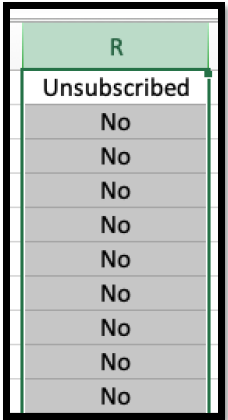
6. Once you have the entire “Unsubscribed” column selected, it’s time to filter out all the “No” clients, as these clients have currently opted into our marketing emails. You want all the clients with “Yes” listed as these clients are Unsubscribed.
7. With the column still selected, find “data” at the top of your Excel window. Click “data” then “filter.” Once you follow these steps, you will see a box appear that you can select.
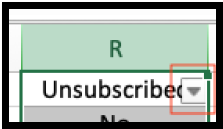
8. When you open the box selector, you will see filter options. Deselect all but the “Yes” section. You will filter all the clients who are subscribed to our email marketing (No), leaving only the Unsubscribed Clients (Yes). This is the data you are looking for.
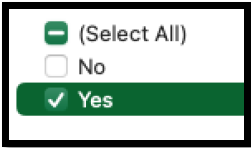
9. Make sure all the clients in your column as Unsubscribed = Yes. You now have a tailored list of only your Unsubscribed Clients.
10. You have two options from here 1. Save your spreadsheet as is to keep your Unsubscribed Clients or 2. Copy all the information from your Unsubscribed Clients, paste it into a new Excel spreadsheet, and then save.